Track Any Phone
- 4.5
- Rating
- 10.00M
- Installs
- Free
- Price
 Analysis by App-foxy
When I test a location app, I do not begin with the map. I begin with a more practical question: what kind of sharing do I actually need? Some people want a family circle where everyone can see everyone else. Others want to send their position to one trusted person without turning their whole day into a shared dashboard. Track Any Phone is aimed at the second situation, and that difference matters more than its short name suggests.
Track Any Phone is a free Travel & Local app from Family Locator Apps. Its central idea is one-way location sharing: you share your position securely rather than automatically creating a mutual tracking network. In my experience, that makes it easier to understand than a full family-locator platform, but also narrower. It is useful when the person receiving your location does not need to share theirs back.
The app has built a substantial audience, with a 4.5 average from around 196 thousand ratings, roughly 1.4 thousand written reviews, and over 10 million installs. Those figures suggest that the simple use case resonates with many people. Still, popularity does not remove the need to choose carefully. Location tools affect privacy, battery habits, trust, and expectations, so the right question is whether this particular approach fits your routine.
You May Also Like

 Blood Strike: 2.5 Anniversary
Blood Strike’s Loadouts Turn Every Drop Into a Tactical Gamble
A close look at Blood Strike’s custom loadouts: how fast access to signature weapons reshapes its battle royale rhythm, rewards preparation, and narrows the gap between fights.

 Pandora - Music & Podcasts
Pandora’s Music Is Easy to Start, but Harder to Recover
Pandora’s strength is its low-effort path from a seed to a station. Its weak spot is how much confidence it asks you to place in connection, setup, and quiet recovery.

 8 Ball Pool
 Is Built on Rivalries, Rematches, and Routine
A close look at the rivalries, rematches, shared routines, and unanswered safety questions that turn a quick pool match into a persistent mobile community.

 Samsung Music
’s Quiet Strength Is Playing What You Already Own
Its reach comes less from spectacle than from dependable access to a personal library. That simplicity is both the app’s strongest retention engine and its ceiling.

 AccuWeather: Weather Radar
AccuWeather Review: A Quick, Clear Forecast for Everyday Decisions
For everyday plans, the best forecast is the one you can understand quickly. AccuWeather makes rain timing, radar, and local conditions easy to act on, with a few trade-offs.

 Hill Climb Racing
Why Hill Climb Racing Still Turns Crashes Into One More Run
A tiny car, a bumpy hill and one more upgrade: Hill Climb Racing keeps resurfacing because its simple chaos makes every near-miss feel personal.
More From Our News Desk
View All News


How I Decide Whether Track Any Phone Fits
I would judge this app on four points: who controls the location share, how much setup is involved, whether the recipient needs a complete account or family network, and how comfortable both people are with the privacy arrangement. A one-way model can be reassuring for a traveler checking in with a relative, but it may feel incomplete to parents or partners who expect shared visibility.
The wording “one-way” is the key to understanding the experience. If I am walking home, visiting a new place, or meeting someone in a busy area, I may want to make my position available without asking the other person to expose theirs. That is a cleaner social arrangement than requesting reciprocal tracking when reciprocity is not needed.
It also changes how I would explain the app to another person. I would not present it as a replacement for every family-safety service. I would describe it as a focused way to share my location with someone who needs to know where I am. That distinction avoids the common mistake of choosing a broad tracking platform for a very small communication problem.
A realistic everyday scenario
Imagine I am traveling across town for an appointment and a family member is waiting for me at a café. They do not need my entire travel history, a permanent family circle, or their own location displayed on my screen. They simply need to know whether I am nearby. A one-way share can reduce the number of messages asking “Where are you now?” and lets me keep control over when I make my position available.
Another useful situation is a short outing where plans may change. I could share my location while moving between stations or walking through an unfamiliar district, then stop using the arrangement when the meeting is over. The important habit is to treat sharing as a deliberate action for a defined purpose, not as something that should remain active by default just because it was convenient once.
For a solo traveler, the app may also work as a check-in tool. Before leaving for a long walk, I could tell a trusted contact that I am sharing my location for the journey. That gives the recipient a practical reference point without requiring both of us to join a permanent location-sharing group. I would still combine it with normal communication, because a map position is not the same thing as a message confirming that everything is fine.
What the focused design gets right
The strongest advantage is simplicity of purpose. Many location apps try to become a complete household command center, with several people, places, alerts, and ongoing activity. Track Any Phone is more appealing when I want to avoid that larger commitment. A person can receive my location without the relationship automatically becoming a two-sided monitoring arrangement.
This is especially helpful for occasional sharing. A friend collecting me from an unfamiliar venue may need my position once, while a relative may need it during a particular trip. In those cases, a lightweight tool can be less awkward than asking everyone to install and configure a broad family service.
The app is also free to start, which lowers the barrier for someone who wants to test the basic idea before deciding whether it belongs in their routine. It is rated for Everyone, and it supports Android devices running version 6.0 or later. The current version is 3.4.3, so users with older phones should check their device compatibility before planning around it.
There is a useful privacy lesson here: one-way sharing is not automatically private simply because it is one-way. The recipient still gets access to a sensitive piece of information, and the person sharing it should be comfortable with that choice. I would use a trusted contact, explain what the share is for, and avoid treating the app as a substitute for consent or clear communication.
Small workflow choices that make a difference
My first practical tip would be to establish the reason for sharing before opening the app. “Find me at the station” is a clear purpose. “Keep watching me” is much less precise. Defining the purpose helps me decide whether I need a temporary check-in or whether a broader family service is genuinely justified.
My second tip is to make the recipient part of the plan. If someone is expecting a location update, I would tell them when I am starting and when I consider the journey finished. This avoids the uncomfortable situation where the other person assumes the share is still active, or where I assume they are looking when they are not.
A third, less obvious trade-off is that one-way sharing can simplify privacy while making coordination more manual. In a mutual family app, everyone may already understand the shared space. Here, I would need to be more intentional about who receives the location and why. That is not a flaw for occasional use, but it can become friction if the same group needs constant coordination every day.
I would also avoid making decisions based on a single map glance. Location information can be misunderstood when someone is indoors, moving through a dense area, or temporarily unable to update. The app’s value is as a communication aid, not as proof that a person is safe, stationary, or available to answer immediately.
Where Other Location Options May Fit Better
The usual alternatives fall into different categories, and choosing among them depends on the relationship and the frequency of use. A built-in phone location-sharing feature may be better for people already using the same mobile ecosystem and wanting a familiar, ongoing arrangement. A family-locator service may suit households that need several members visible to one another. A messaging app may be enough when the need is simply to send a temporary live position during a conversation.
Track Any Phone makes more sense when I specifically want the one-way model and do not need a large collection of family-management features. If everyone in a household expects reciprocal visibility, recurring alerts, or a shared map that remains central to daily routines, I would investigate a fuller family solution instead. I would not choose this app merely because its name sounds universal; I would choose it because its sharing direction matches the situation.
There is also a difference between location sharing and emergency communication. If my main concern is urgent assistance, I would prioritize the emergency tools already available on my phone and the contact methods my family reliably answers. A location app can support a safety plan, but it should not be the only part of one.
For occasional meetups, the focused approach may actually be less burdensome than a family platform. A recipient who only needs to find me does not necessarily want another permanent account, another map to check, or another stream of location information. The trade-off is that Track Any Phone may feel too limited once the group grows or the arrangement becomes routine.
Privacy, trust, and the cost of changing habits
Switching to a new location app is not just an installation decision. I would need to tell regular contacts where to find my location, establish a new routine, and make sure everyone understands whether sharing is one-way or mutual. If a family already relies on another service, moving can create confusion during the exact moments when clarity matters most.
That switching cost is lower for a single trip or occasional meeting. I can introduce the app to one trusted contact and use it for a clearly defined purpose. It is higher for households that have built routines around a shared map. In that case, the convenience of a new app must be strong enough to justify teaching the group a different workflow.
The in-app purchase range is from $4.99 to $59.99 per item. I would therefore look carefully at what is available without payment and what, if anything, I would actually need before committing to a paid option. The app is free, but “free to install” should not be confused with “every possible use is free.” For a simple one-off location share, I would start cautiously and avoid paying until the basic workflow has proven useful.
Another practical cost is attention. A location service can encourage people to check the map repeatedly instead of sending a direct message. I prefer to use it as background support: share when there is a genuine coordination reason, communicate normally when a conversation is needed, and stop treating the map as a live substitute for trust.
Who should use it, and who should skip it?
I would recommend Track Any Phone to a solo traveler who wants a trusted person to know where they are, someone meeting a friend in an unfamiliar place, or a user who wants one-direction sharing without creating a full family network. It is also worth considering for people who find reciprocal tracking uncomfortable but still want a practical way to check in.
I would be more hesitant to recommend it to a household that expects everyone to see everyone else continuously. Parents seeking a broad family-management system, couples who want mutual location sharing as a permanent routine, or groups that depend on multiple coordinated features may be happier with a dedicated family-locator category. The issue is not that Track Any Phone is poor; it is that a focused tool can become inconvenient when the job expands.
I would also skip it if the person receiving the location is not trusted, if the sharing arrangement has not been discussed clearly, or if the user expects a map to guarantee safety. No location app can replace judgment, a working phone, and an agreed communication plan. The simpler the app appears, the more important it is to supply the missing human context yourself.
My recommendation after weighing the trade-offs
My overall view is positive, but deliberately narrow. Track Any Phone is a sensible choice when the central requirement is secure, one-way location sharing and the situation does not justify a full family-tracking ecosystem. Its free entry point, broad availability, and clear concept make it approachable, while the large install base and strong average rating show that the idea has found an audience.
I would install it for occasional travel check-ins, meeting coordination, or a trusted contact who needs to know where I am without sharing their own location. I would not install it expecting a complete household safety platform. That expectation mismatch is the main risk.
Before relying on it, I would confirm that my phone meets the Android requirement, test the sharing flow with the intended recipient, agree on when the location will be used, and review the paid options rather than assuming every feature is included. Those few steps address the most likely sources of frustration.
My clear recommendation is to choose Track Any Phone when one-way sharing is the feature you genuinely need. If your situation calls for a permanent, mutual family map, a different category will probably serve you better. For everyone else, especially people who want a straightforward way to share their position for a particular journey or meeting, this app offers a focused solution without forcing the whole relationship into a tracking network.
FAQs for Track Any Phone
01What is Track Any Phone and how does it work?
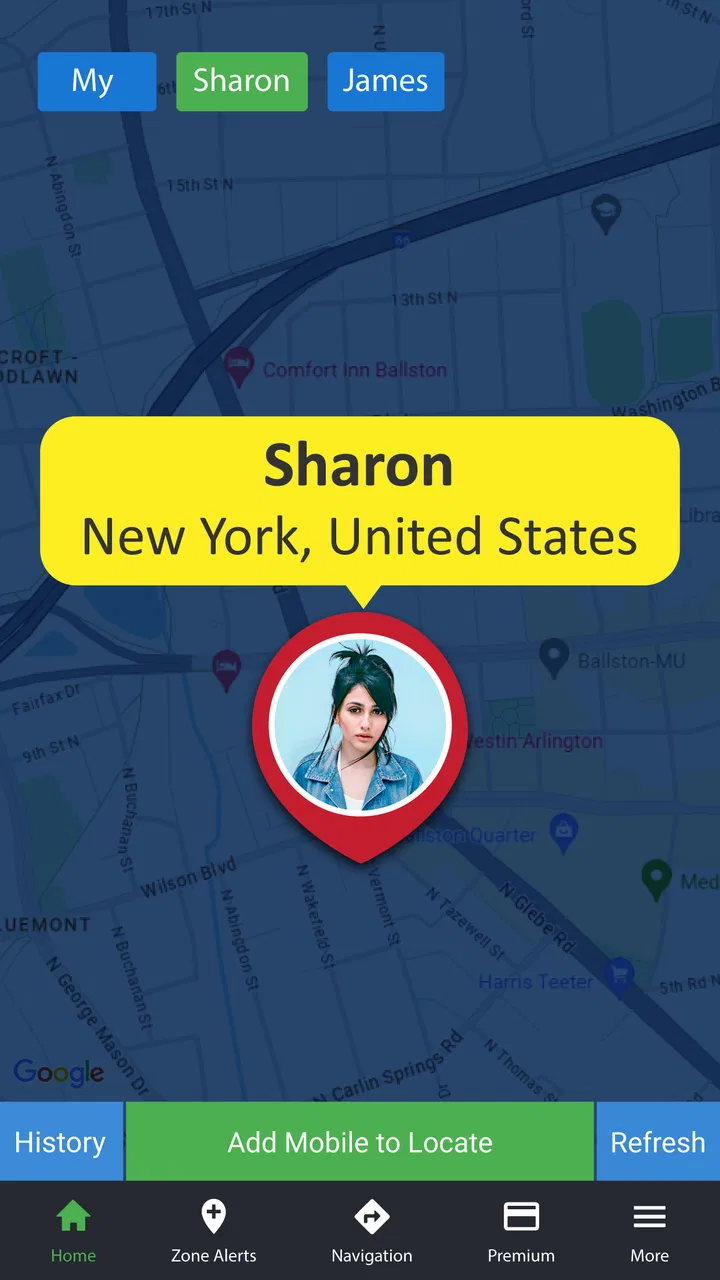
Track Any Phone is a mobile application designed to help users locate smartphones in real-time. It leverages GPS and network signals to provide accurate location tracking. Users can track lost devices or monitor the location of family members with their consent, ensuring peace of mind and security.
02Is Track Any Phone compatible with both Android and iOS devices?
Yes, Track Any Phone is compatible with both Android and iOS platforms. The app is designed to work seamlessly across different devices, providing users with flexibility and convenience. Ensure your device meets the minimum system requirements for optimal performance and access to all features.
03How secure is the data and privacy of users on Track Any Phone?
Track Any Phone prioritizes user privacy and data security by employing encryption technologies to protect user information. It requires explicit consent from individuals being tracked, and users have control over their data. The app complies with privacy regulations to ensure user data is handled responsibly.
04Are there any costs associated with using Track Any Phone?
Track Any Phone offers a free version with basic features, while premium plans unlock advanced functionalities such as real-time updates and detailed location history. Users can choose a plan based on their needs and budget. Check the app store for current pricing and subscription details.
05What are the key features of Track Any Phone?
Track Any Phone includes features like real-time location tracking, geofencing alerts, location history, and customizable notifications. These tools are designed to enhance user experience by providing detailed insights and alerts, ensuring users stay informed about the whereabouts of their tracked devices.
Pros
- Easy-to-use interface for all users.
- Accurate location tracking in real-time.
- Minimal battery consumption.
- Supports multiple devices seamlessly.
- Customizable alerts for location updates.
Cons
- Requires internet for accurate tracking.
- Limited features in the free version.
- Potential privacy concerns.
- Occasional location update delays.
- No offline mode available.

Track Any Phone
Gallery